
SPOT THE AI
Spot the AI by finding inconsistencies
The strongest AI clues are often not strange objects. They are small inconsistencies between parts of an otherwise convincing image. Learning where to look is more useful than memorizing a list of old generator mistakes.
A repeatable method
Don't guess from one clue. Inspect in layers.
The most useful skill is not memorizing yesterday's AI mistakes. It is learning where several parts of an image must agree with each other.
1. Read the whole image
Start at normal size. Ask whether the scene, expression, lighting and camera feel belong together before hunting for tiny defects.
2. Zoom into high-information areas
Eyes, hair edges, teeth, glasses, fingers, reflections and contact points force many visual relationships to agree at once.
3. Compare, don't stereotype
One smooth cheek or unusual tooth proves very little. Compare several independent clues and look for contradictions.
4. Make a weighted decision
Give more weight to structural inconsistencies than to vague 'AI vibes'. Modern generated images can be extremely convincing.
Visual field guide
Where to look — and why it matters
These are comparison zones, not automatic proof. A strong judgement usually comes from several clues pointing in the same direction.
Edges and boundaries
Look where hair, fur, fingers, objects or clothing meet the background. AI can create subtle merging, missing separation or inconsistent fine detail.
Texture variation
Real photographs usually contain irregular micro-texture. Generated images can make skin, fabric, food, foliage or surfaces look unusually even or locally inconsistent.
Reflections and lighting
Check whether highlights, shadows and reflections agree with each other. Small contradictions can be more informative than the overall realism of the image.
Text and geometry
Signs, labels, repeating patterns and rigid shapes are useful comparison points. Modern models are better at them than before, but small structural errors still appear.
Visual lesson · Spot the AI
Mouth, glasses and hair edges
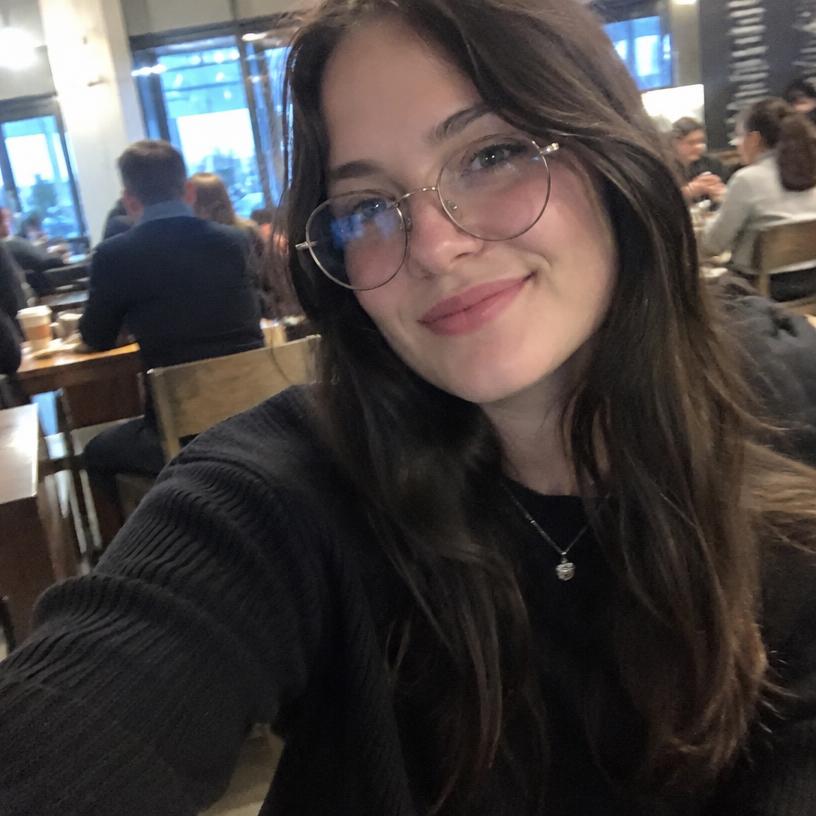
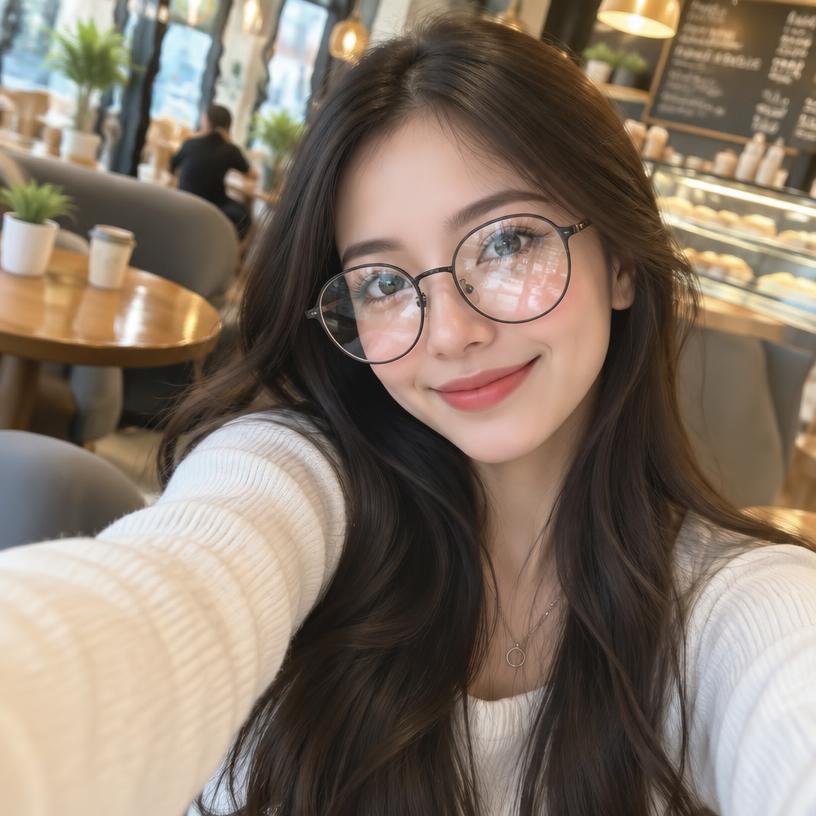
This pair has three especially useful local comparison zones. The markers point directly to each one in both images.
The numbered markers correspond directly to the numbered explanations below.
 A123
 B123
Mouth and lip edge
Marker 1 is on the mouth. Compare lip contour, smile geometry, teeth visibility and the shadow where the lips meet.
Glasses and eye reflections
Marker 2 is on the glasses and eye area. Compare frame geometry, lens reflections, eye visibility and whether reflections fit the scene.
Hair-to-background edge
Marker 3 is on an outer hair edge. Inspect fine strands and whether the transition into the café background remains coherent.
Takeaway: The strongest clues usually come from a specific structure you can point to and compare directly, not from a vague feeling that an image looks synthetic.
Strong clues
Several independent inconsistencies that reinforce each other: geometry, lighting, reflections, anatomy, contact points or local texture that does not fit the same camera and scene.
Weak clues
“Too perfect”, smooth skin, dramatic lighting or one odd feature. Real photography, retouching, compression and portrait mode can create all of these too.
Look where visual systems have to agree
Useful inspection areas are places where several constraints overlap. A hand holding a cup involves anatomy, contact, perspective, shadows and object shape. A shop sign involves letters, perspective, material and lighting. A reflection must reproduce scene geometry from another angle.
These intersections carry more information than isolated details because a generated image has to satisfy many relationships at once.
Do not overlearn yesterday's artifacts
AI image quality changes quickly. Extra fingers, garbled signs and waxy faces still occur, but they are much less dependable as universal rules than they once were. A guide that only teaches those artifacts becomes obsolete quickly.
A better skill is consistency checking: does the image remain coherent across materials, depth, lighting, anatomy and repeated structure? That approach continues to be useful even as individual models improve.
Practice with immediate explanations
Feedback matters because visual guessing can reinforce the wrong rule. If you choose correctly for the wrong reason, you have not learned much. FaceOrBot shows the answer and then explains the relevant visual evidence for that specific pair.
That makes difficult examples valuable. A near-photorealistic AI image forces you to compare evidence carefully and gives you a clearer picture of which clues still matter.
Remember
A visual clue is evidence — not proof.
A real photo can contain blur, strange teeth, aggressive sharpening, beauty filters or broken-looking edges. An AI image can be almost flawless. Confidence should rise when several independent details fail in a consistent way, not because one feature looks unusual.
Frequently asked questions
What does 'spot the AI' mean?
It means identifying which image in a comparison was generated by an AI system rather than captured as a real photograph.
Is there one reliable AI artifact?
No. Current generators vary widely. Multiple consistent clues are more useful than one supposed tell.
Can image quality affect the test?
Yes. Compression, cropping and low resolution can hide both real photographic detail and AI artifacts, which makes some comparisons harder.
Train your eye instead of memorizing rules
FaceOrBot gives immediate feedback after every choice and explains what was worth inspecting. That makes each round a short visual lesson rather than just a score.